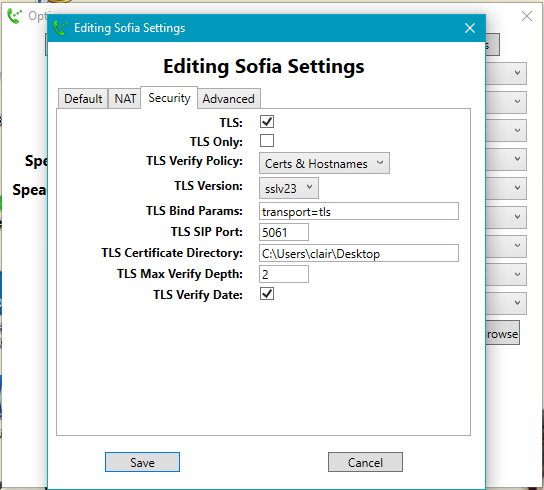
Hi All, Please help me when you get a chance. I’ve follow the instruction link below to configure TLS in my freeswitch server, but it failed with my FSClient 1.2.3.5. I copied cafile.pem from my freeswitch to my windows desktop and gived the right directory under “TLS Certificate Directory” shown as below screenshot (also attached). https://freeswitch.org/confluence/display/FREESWITCH/SIP+TLS But I still cannot log in with tls, console log output, and configuration files are below. Kindly take a look and let me know if additional info is needed. I used ./gentls_cert setup -cn 52.35.22.204 -alt DNS: 52.35.22.204 -org 52.35.22.204. Below is the view of one cert: root@ip-172-31-28-201:/usr/local/freeswitch/conf/ssl# openssl x509 -noout -inform pem -text -in /usr/local/freeswitch/conf/ssl/agent.pem Certificate: Data: Version: 3 (0x2) Serial Number: be:37:19:a3:98:6e:82:19 Signature Algorithm: sha1WithRSAEncryption Issuer: CN=52.35.22.204, O=52.35.22.204 Validity Not Before: Nov 12 21:20:24 2016 GMT Not After : Nov 11 21:20:24 2022 GMT Subject: CN=52.35.22.204, O=52.35.22.204 Subject Public Key Info: Public Key Algorithm: rsaEncryption Public-Key: (2048 bit) Modulus: 00:bd:01:6a:df:ae:35:f2:82:1f:ca:af:cf:7b:97: 2f:ec:a5:2d:ec:7c:3d:0a:c3:fb:e2:17:d3:78:b6: dc:c6:60:b6:14:eb:6e:5e:96:c2:ef:bf:d8:9f:a7: 19:a1:36:a5:82:37:5b:8b:0a:5d:95:00:9c:11:f0: 90:77:e6:34:f1:36:b3:c9:62:8e:82:28:d3:41:fd: 0a:3e:67:32:57:c2:52:71:8a:9b:99:4c:e0:4b:e4: 15:e0:53:0c:46:d0:98:1a:05:8e:79:f4:c6:d4:0b: b8:16:ea:24:80:1c:67:67:12:16:c4:29:f1:d5:81: ab:4b:b6:a4:b7:f7:a7:ad:11:34:ef:9c:70:dc:a9: 4a:da:9f:dd:14:71:7e:7d:b1:91:ab:f6:fb:f3:fd: a0:9f:56:ab:89:eb:91:fd:1e:74:d6:55:a0:bb:6e: 1d:94:1d:08:c7:26:2d:85:45:46:b4:44:84:e5:ed: 68:83:e6:25:2b:fd:82:d5:7c:67:ce:32:d9:15:d1: de:00:85:62:d7:f7:ad:a8:c2:17:a1:55:c3:64:08: a3:9e:d8:6d:55:f7:4d:a9:4f:73:75:31:74:3c:21: 3b:1e:27:6b:fb:3c:40:49:80:55:0c:dd:90:fe:4c: da:8c:a4:10:d8:bf:1b:12:15:56:81:0a:15:64:04: cc:d3 Exponent: 65537 (0x10001) X509v3 extensions: Netscape Comment: FS Server Cert X509v3 Basic Constraints: CA:FALSE X509v3 Subject Key Identifier: 74:5E:4B:09:21:37:50:1F:BB:F1:A8:D5:1D:6D:D7:36:D9:D5:EE:AD X509v3 Authority Key Identifier: keyid:0B:51:AF:BF:BF:8F:2A:94:8A:18:B6:70:4F:9A:0B:FA:EB:4B: 49:FC DirName:/CN=52.35.22.204/O=52.35.22.204 serial:F5:5B:BD:AA:25:4E:16:0B X509v3 Subject Alternative Name: DNS:52.35.22.204 Netscape Cert Type: SSL Server X509v3 Extended Key Usage: TLS Web Server Authentication Signature Algorithm: sha1WithRSAEncryption e7:35:1e:9a:70:6c:1c:61:2f:c8:50:8f:5d:a8:7d:73:cc:a4: c0:7a:54:02:65:91:49:82:0b:86:7f:45:44:91:b2:14:32:c3: d6:50:5c:41:28:f3:80:ca:ea:2b:c3:2c:d7:d8:09:90:11:8b: fe:4e:8d:35:4f:ca:ec:cb:6b:05:ee:63:e3:17:17:4f:be:bb: f7:85:f4:4a:3a:34:b6:4f:c1:5c:d7:07:7e:f5:d5:a5:ae:40: 3c:25:2a:70:24:6d:0e:3c:e4:e1:64:43:7a:6e:10:ad:a2:9e: 38:d5:e3:91:de:4f:e5:60:27:44:58:7c:2a:42:2a:f2:6f:19: 60:d5:01:48:01:39:1a:18:30:3a:f5:e7:d8:fd:c6:00:22:a4: f7:4b:44:c9:c7:4d:02:2a:d3:d4:1b:f2:e6:35:63:7b:c9:0d: 69:2c:38:7f:04:e1:5e:9a:0c:13:21:50:d5:78:3b:22:f4:11: f4:09:73:e8:58:c5:c4:ba:33:28:88:cc:28:c7:7b:1b:73:11: 06:15:ad:29:1a:25:47:0c:91:be:6d:20:7d:88:6e:6a:a1:53: a6:95:84:cc:d3:bc:10:18:e5:43:fa:5c:96:c3:7b:ce:98:c0: d3:dc:81:8c:ea:85:83:69:39:63:2e:fa:a1:03:0e:69:5e:be: c4:52:8c:25 [image: Inline image 1] *Console output:* tport.c:2749 tport_wakeup_pri() tport_wakeup_pri(0x7fcee8050770): events IN tport.c:862 tport_alloc_secondary() tport_alloc_secondary(0x7fcee8050770): new secondary tport 0x7fcee8252ea0 tport_type_tcp.c:203 tport_tcp_init_secondary() tport_tcp_init_secondary(0x7fcee8252ea0): Setting TCP_KEEPIDLE to 30 tport_type_tcp.c:209 tport_tcp_init_secondary() tport_tcp_init_secondary(0x7fcee8252ea0): Setting TCP_KEEPINTVL to 30 tport_type_tls.c:610 tport_tls_accept() tport_tls_accept(0x7fcee8252ea0): new connection from tls/50.187.205.251:56612/sips tport_tls.c:955 tls_connect() tls_connect(0x7fcee8252ea0): events NEGOTIATING tport_tls.c:1044 tls_connect() tls_connect(0x7fcee8252ea0): TLS setup failed (error:00000001:lib(0):func(0):reason(1)) tport.c:2090 tport_close() tport_close(0x7fcee8252ea0): tls/ 50.187.205.251:56612/sips tport.c:2263 tport_set_secondary_timer() tport(0x7fcee8252ea0): set timer at 0 ms because zap freeswitch@ip-172-31-28-201> sofia status Name Type Data State ============================================================ ===================================== external-ipv6 profile sip:mod_sofia@[::1]:5080 RUNNING (0) 172.31.28.201 alias internal ALIASED external profile sip:mod_sofia@52.35.22.204:5080 RUNNING (0) external::example.com gateway sip:joeuser@example.com NOREG internal-ipv6 profile sip:mod_sofia@[::1]:5060 RUNNING (0) internal-ipv6 profile sip:mod_sofia@[::1]:5061 RUNNING (0) (TLS) internal profile sip:mod_sofia@52.35.22.204:5060 RUNNING (0) internal profile sip:mod_sofia@52.35.22.204:5061 RUNNING (0) (TLS) ============================================================ ===================================== 4 profiles 1 alias *Under vars.xml:* <X-PRE-PROCESS cmd="set" data="sip_tls_version=sslv23"/> <!-- TLS cipher suite: default ALL:!ADH:!LOW:!EXP:!MD5:@STRENGTH The actual ciphers supported will change per platform. openssl ciphers -v 'ALL:!ADH:!LOW:!EXP:!MD5:@STRENGTH' Will show you what is available in your verion of openssl. --> <X-PRE-PROCESS cmd="set" data="sip_tls_ciphers=ALL:! ADH:!LOW:!EXP:!MD5:@STRENGTH"/> <!-- Internal SIP Profile --> <X-PRE-PROCESS cmd="set" data="internal_auth_calls=true"/> <X-PRE-PROCESS cmd="set" data="internal_sip_port=5060"/> <X-PRE-PROCESS cmd="set" data="internal_tls_port=5061"/> <X-PRE-PROCESS cmd="set" data="internal_ssl_enable=true"/> <X-PRE-PROCESS cmd="set" data="internal_ssl_dir=/usr/ local/freeswitch/conf/ssl"/> *Under internel.xml: * <!-- TLS: disabled by default, set to "true" to enable --> <param name="tls" value="true"/> <!-- Set to true to not bind on the normal sip-port but only on the TLS port --> <param name="tls-only" value="false"/> <!-- additional bind parameters for TLS --> <param name="tls-bind-params" value="transport=tls"/> <!-- Port to listen on for TLS requests. (5061 will be used if unspecified) --> <param name="tls-sip-port" value="$${internal_tls_port}"/> <!-- Location of the agent.pem and cafile.pem ssl certificates (needed for TLS server) --> <!--<param name="tls-cert-dir" value=""/>--> <!-- Optionally set the passphrase password used by openSSL to encrypt/decrypt TLS private key files --> <param name="tls-passphrase" value=""/> <!-- Verify the date on TLS certificates --> <param name="tls-verify-date" value="true"/> <!-- TLS verify policy, when registering/inviting gateways with other servers (outbound) or handling inbound registration/invite requests how should we verify their certificate --> <!-- set to 'in' to only verify incoming connections, 'out' to only verify outgoing connections, 'all' to verify all connections, also 'subjects_in', 'subjects_out' and 'subjects_all' for subject validation. Multiple policies can be$ <param name="tls-verify-policy" value="in"/> <!-- Certificate max verify depth to use for validating peer TLS certificates when the verify policy is not none --> <param name="tls-verify-depth" value="2"/> <!-- If the tls-verify-policy is set to subjects_all or subjects_in this sets which subjects are allowed, multiple subjects can be split with a '|' pipe --> <param name="tls-verify-in-subjects" value=""/> <!-- TLS version default: tlsv1,tlsv1.1,tlsv1.2 --> <param name="tls-version" value="$${sip_tls_version}"/> <!-- TLS ciphers default: ALL:!ADH:!LOW:!EXP:!MD5:@STRENGTH --> <param name="tls-ciphers" value="$${sip_tls_ciphers}"/> Thanks, Clarie -- Xiyu Zhao Northeastern University College of Engineering Telecommunication Systems Management Email claire.zxy@gmail.com ᐧ